Help & Guidelines
Everything you need to know to create the perfect ID photo.
Photo Guidelines
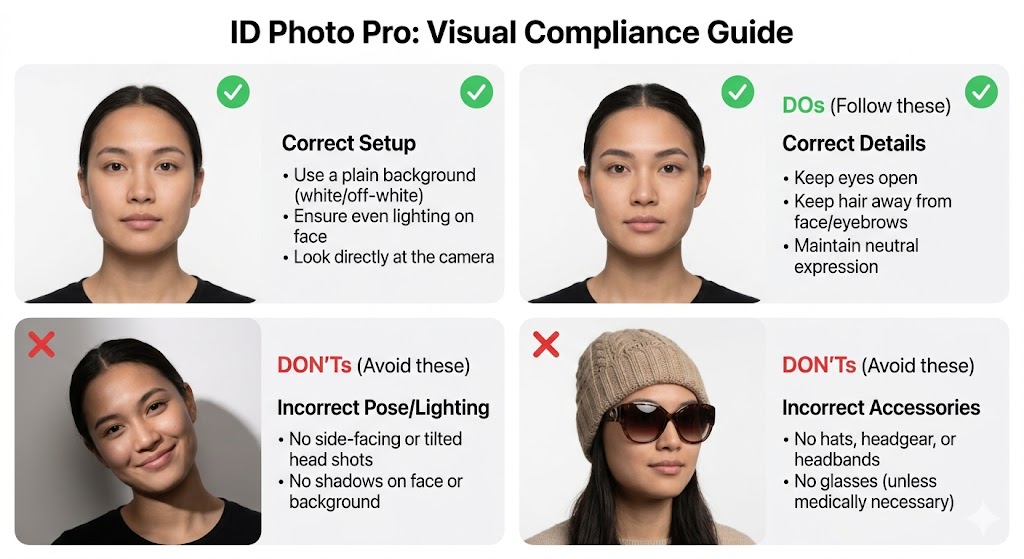
Dos (Follow these)
- • Use a plain background (white or off-white).
- • Ensure even lighting on your face.
- • Look directly at the camera with eyes open.
- • Keep a neutral facial expression.
- • Keep hair away from your face and eyebrows.
Don'ts (Avoid these)
- • No hats, headgear, or headbands.
- • No glasses (unless medically necessary).
- • No side-facing or tilted head shots.
- • No shadows on your face or the background.
- • No white or light-blue clothing.
Supported Standards
Privacy & Security
Local Analysis
Initial face detection happens 100% locally in your browser. Your photo is never sent to a cloud server for scanning.
Encrypted Processing
Background removal is processed via an encrypted SSL tunnel in RAM. We never write your data to disk.
No Data Retention
We do not store your original or processed photos. Once you close the tab, your data is gone forever.
Frequently Asked Questions
Is this tool free?
Yes! Creating and downloading the 4x6 layout is completely free.
What is a 4x6 layout?
It's a standard photo print size (10x15cm). Our layout fits multiple passport photos on one sheet to save you money on printing.
Will the government accept these photos?
Our AI follows strict ICAO and biometric standards. However, acceptance depends on your photo quality (lighting, clothing). Always verify against local requirements.
Can I use it on mobile?
Absolutely. The site is fully responsive and supports direct camera access on iOS and Android.